Pulling structured data out of unstructured documents
Are you one of those who sends every document to an AI to pull out structured data? Sometimes it’s the fastest call. Sometimes it’s not the best solution.
A résumé is a database row wearing a costume. Somewhere in that two-page PDF there’s a name, an email, a phone number, a list of jobs with start and end dates, and a stack of skills: all the fields you’d want in a clean table. The trouble is that they’re scattered across columns, headers, bullet lists, and tables, formatted however the author felt like that day. The same is true of a recipe (a title, a yield, an ingredient list with quantities, a sequence of steps), an invoice (a number, a date, line items, a total), or a receipt.
Now think of processing thousands of résumés, recipes or receipts. Not practical at all, right? So you automate it, and that’s where the real problem starts.
The facts are structured. The document isn’t. Pulling one out of the other is the whole game, and the reliable way to do it is almost never a single technique. It’s a small pipeline: parse the layout, apply deterministic rules where they’re strong, and fall back to a language model only for the genuinely fuzzy fields, with a check that what the model gave you actually appears in the source.
I keep meeting this problem in real work. RegWatch, a regulatory-monitoring tool I’m building in public, reads the Diário Oficial (Brazil’s official government gazette, published as long stretches of free-form text) and has to wrestle discrete, monitorable facts out of it. So this post walks through that toolbox and, more importantly, when to reach for each piece. The code here is fresh and generic, built on a couple of invented sample documents; nothing is tied to a particular product or dataset.
The toolbox
And for a field a five-line regex would nail, handing it to an LLM is the slow, expensive, least reliable path. Knowing the full menu is what lets you tell those cases apart:
- Regex and heuristics: fast, free, fully deterministic, and trivially auditable. Brilliant for fields with a regular surface form (emails, phone numbers, ISO dates, currency amounts). Brittle the moment the format wanders.
- Layout-aware parsing: tools like PyMuPDF and pdfplumber recover the geometry of a page: text blocks, lines, words, and tables, each with a bounding box. That spatial information is often the missing key: “the value to the right of the label
Total” is a layout fact, not a text fact. - Named-entity recognition (NER): a model like spaCy tags spans as
PERSON,ORG,DATE,MONEY, and so on. It generalises past fixed patterns without the cost of a large model, and it’s the natural tool for “find the names and dates” when you can’t predict their exact form. - Document-AI models: purpose-built transformers that read text and layout (and sometimes pixels). LayoutLM jointly pre-trains text and layout for document understanding; Donut goes OCR-free and decodes a document image straight into a structured sequence. These shine on scanned forms and receipts where pure-text approaches lose the spatial signal.
- LLM extraction: the most flexible option. Hand the model some text and a schema, get structured output back. It handles messy, varied, semantically-loaded fields that defeat rules. The costs are real, though: latency, money, and a tendency to invent plausible values that aren’t in the document. That last one is the whole reason for grounding, below.
The skill isn’t picking one. It’s a routing problem, a tiered fallback: send each field to the cheapest technique that handles it well, and only escalate when you have to.
Structure first
Before you extract anything, get the document into a representation that preserves where things are. Flattening a PDF to a single string throws away the column structure, the table boundaries, and the label-value adjacency that make extraction tractable. Layout-aware parsers keep all of that.
PyMuPDF’s get_text("dict") returns a nested structure of blocks → lines → spans, each carrying a bounding box. That’s enough to reconstruct reading order, detect columns, or find the text physically next to a label:
import fitz  # PyMuPDF

def layout_blocks(pdf_path: str) -> list[dict]:
    """Yield text blocks with their geometry from the first page."""
    doc = fitz.open(pdf_path)
    page = doc[0]
    blocks = []
    for block in page.get_text("dict")["blocks"]:
        if "lines" not in block:        # skip image blocks
            continue
        text = " ".join(
            span["text"]
            for line in block["lines"]
            for span in line["spans"]
        ).strip()
        if text:
            blocks.append({"bbox": block["bbox"], "text": text})
    return blocks


for b in layout_blocks("sample_cv.pdf"):
    x0, y0, x1, y1 = b["bbox"]
    print(f"[{x0:6.0f},{y0:6.0f}] {b['text'][:60]}")
Now you have positioned text. For tabular documents (invoices, receipts), pdfplumber’s extract_tables() and extract_words() go further, recovering cells and word boxes directly. The point is the same either way: extraction gets dramatically easier once you can ask where something is, not just whether a string appears.
Heuristics where they’re strong
With the text in hand, knock out the easy fields with deterministic rules. Emails, phone numbers, and amounts have regular enough surface forms that a regex is both faster and more trustworthy than any model. When it’s wrong, you can see exactly why.
import re

PATTERNS = {
    "email": re.compile(r"[\w.+-]+@[\w-]+\.[\w.-]+"),
    "phone": re.compile(r"\+?\d[\d\s().-]{7,}\d"),
    "amount": re.compile(r"(?:R\$|\$|€)\s?\d[\d.,]*"),
    "iso_date": re.compile(r"\b\d{4}-\d{2}-\d{2}\b"),
}

def heuristic_fields(text: str) -> dict[str, list[str]]:
    return {name: pat.findall(text) for name, pat in PATTERNS.items()}


sample = "Contact: ana.souza@example.com, +55 11 99876-5432. Total: R$ 1.299,90"
print(heuristic_fields(sample))
# {'email': ['ana.souza@example.com'],
#  'phone': ['+55 11 99876-5432'],
#  'amount': ['R$ 1.299,90'],
#  'iso_date': []}
For fields that are named entities rather than fixed patterns (a person’s name, an organisation, a free-text date like “March 2021”), reach for NER instead. spaCy gives you typed spans without any pattern engineering:
import spacy

nlp = spacy.load("en_core_web_sm")

def entities(text: str) -> dict[str, list[str]]:
    doc = nlp(text)
    wanted = {"PERSON", "ORG", "DATE", "MONEY"}
    out: dict[str, list[str]] = {}
    for ent in doc.ents:
        if ent.label_ in wanted:
            out.setdefault(ent.label_, []).append(ent.text)
    return out


print(entities("Ana Souza worked at Acme Corp from March 2021 to June 2023."))
# {'PERSON': ['Ana Souza'], 'ORG': ['Acme Corp'],
#  'DATE': ['March 2021 to June 2023']}
This is the layer that does most of the work for free. Anything regex or NER resolves confidently never needs to touch a language model.
An LLM for the fuzzy fields (and grounding it)
Some fields resist all of the above. “What is this candidate’s most senior role?” or “Summarise the dietary tags for this recipe” require reading and judgement, not pattern matching. This is where an LLM earns its cost, but only if you constrain it and verify it.
Two things make LLM extraction trustworthy:
- Force the shape. Give the model a JSON schema and require the output to conform to it, so you get a key for every field and nothing extra. Modern APIs support this directly: OpenAI’s Structured Outputs guarantees the response matches a supplied JSON Schema, and Anthropic’s tool use does the same job through a tool’s
input_schema. (I wrote about hiding those provider differences behind one interface in a provider-agnostic LLM abstraction.) - Ground every value. A schema stops the model from omitting keys; it does not stop it from inventing a plausible email or a job title that’s nowhere in the document. So after extraction, check that each value actually occurs in the source text. Anything that doesn’t is flagged, not trusted.
Here’s the shape of it, provider-agnostic, with the grounding check as a hard gate:
import json

SCHEMA = {
    "type": "object",
    "properties": {
        "full_name": {"type": "string"},
        "email": {"type": "string"},
        "most_senior_role": {"type": "string"},
    },
    "required": ["full_name", "email", "most_senior_role"],
}

def extract_with_llm(text: str, client) -> dict:
    """Call your LLM of choice, constrained to SCHEMA, and parse JSON."""
    prompt = (
        "Extract the fields in the schema from the document below. "
        "Copy values verbatim from the text; do not guess.\n\n"
        f"SCHEMA:\n{json.dumps(SCHEMA)}\n\nDOCUMENT:\n{text}"
    )
    raw = client.complete(prompt, response_schema=SCHEMA)  # your wrapper
    return json.loads(raw)


def ground(fields: dict, source: str) -> dict:
    """Keep only values that actually appear in the source text."""
    haystack = source.lower()
    verified, flagged = {}, {}
    for key, value in fields.items():
        if isinstance(value, str) and value.lower() in haystack:
            verified[key] = value
        else:
            flagged[key] = value          # possibly hallucinated
    return {"verified": verified, "flagged": flagged}
The grounding step is deliberately strict: exact-substring is a starting point, and in practice you’ll relax it (normalise whitespace, allow fuzzy matches for reformatted dates or amounts). But the principle holds: an extracted value you can’t trace back to the document is a claim, not a fact. Treat it accordingly. That instinct, verify the model against a source of truth rather than take its word, is the same one behind ReplayGate, where I judge a replayed agent conversation against invariants instead of trusting it ran clean.
Measuring it
You can’t tune a pipeline you don’t measure. Build a small benchmark of documents with hand-labelled answers, then score each field (precision, recall, F1) for each technique. The per-field view is what tells you where to spend effort.
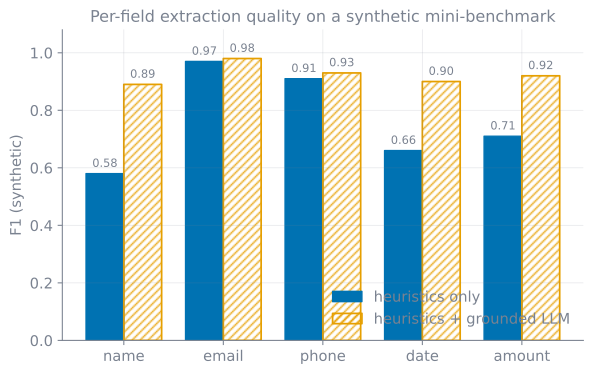
The chart below is from a synthetic, illustrative mini-benchmark (a handful of invented sample CVs and recipes), comparing heuristics alone against heuristics with a grounded-LLM fallback. The numbers aren’t measured on any real corpus: they encode a pattern that shows up repeatedly in practice.
The story it tells is the thesis of this whole post. Heuristics are essentially solved on regular fields (email, phone). Adding an LLM there buys you almost nothing and costs you latency and money. On the irregular fields (name, free-text date, locale-varying amount), the deterministic layer leaves real gaps, and that’s exactly where the LLM fallback pays for itself. Routing per field (cheap rules first, model only for the hard parts) gets you most of the accuracy at a fraction of the cost of sending everything to the model.
A note on personal data
Résumés, invoices, and receipts are full of personal data: names, contact details, sometimes far more. The moment your pipeline touches them, you’re a data processor with obligations. In the EU that’s the GDPR; in Brazil it’s the LGPD (Lei nº 13.709/2018). Both rest on the same ideas: collect only what you need, have a lawful basis for processing it, keep it secure, and don’t retain it longer than necessary.
A few things that follow directly for an extraction pipeline:
- Minimise. Extract only the fields you actually use. “We grab everything just in case” is a liability, not a feature.
- Be careful where the text goes. Sending documents to a third-party LLM API means personal data leaves your premises. Know your provider’s data-retention and training policies, and consider redacting obvious identifiers before the call, or running extraction locally for sensitive corpora.
- Log results, not raw documents. Retain the structured output you need; avoid keeping copies of source documents you no longer require.
None of this is legal advice, but building these habits into the pipeline from the start is far cheaper than retrofitting them.
References and further reading
- PyMuPDF: text extraction as a structured dictionary:
get_text("dict")blocks, lines, spans and their bounding boxes - pdfplumber: word boxes,
extract_words()andextract_tables()for layout-aware parsing - spaCy: named entities:
doc.entswithPERSON/ORG/DATE/MONEYlabels - LayoutLM (arXiv:1912.13318): pre-training text and layout for document image understanding
- Donut (arXiv:2111.15664): OCR-free document understanding · Transformers model docs showing JSON output via
token2json - OpenAI Structured Outputs and Anthropic tool use: constrain LLM output to a JSON schema
- GDPR (Regulation (EU) 2016/679) and LGPD (Lei nº 13.709/2018): handling personal data in extracted documents
Working on something in this space, or hiring for it?
Keep reading
- The cheaper model that cost 51% more: what my eval harness caughtGPT-5.6-terra lists 20% below GPT-5.4 on both input and output. I swapped my expense tracker's default to it on that basis, then measured it against real receipts: it cost 51% more per receipt, and it would have returned HTTP 400 on every single photo.August 17, 2026
- Don't let the LLM do the math: deterministic discount proration for receipt OCRA vision model reads the receipt fine, then quietly loses a cent splitting the discount. Here's why I moved the arithmetic out of the model into a small Python function whose shares always sum to the amount paid.August 7, 2026
- Model churn is a maintenance tax: what broke when GPT-5.6 and Gemini renamed everythingA provider-agnostic layer is the easy part. The recurring cost is keeping the model IDs and capabilities current as GPT-5.6 and Gemini reshuffle underneath you. Here's the churn my adapter absorbed this month, and the three call sites the refresh silently repointed.August 4, 2026
Get the next update by email
Build-in-public updates and new posts, delivered as a digest. Double opt-in · no spam · unsubscribe anytime · handled by Buttondown.