Running LLM-Generated Code Without Getting Burned
Language models are good at writing code. Ask one to compute a correlation, reshape a dataset, or plot two columns against each other, and it will happily produce a few lines of Python that do exactly that. What it can’t do on its own is run that code, look at the result, and use it to answer your question. Closing that loop — letting a model write code, execute it, and read the output back — is what turns a chatbot into something that can actually do data analysis, and it’s the same kind of self-checkable signal I baked into plans written for a model to execute: a command it can run and a result it can read.
It’s also where things get dangerous. The moment you execute text a model generated, you’re running untrusted code on your machine. This post is about how to do that without handing an attacker (or a confused model) the keys to your server.
Why running model-written code is dangerous
The problem isn’t that models are malicious. It’s that “run this Python” is an enormous capability, and a model can be steered into misusing it — by a prompt injection hidden in a document it’s analyzing, by a jailbreak, or simply by hallucinating something destructive. Once arbitrary code runs in your process, it can:
- Read secrets — environment variables, API keys, the contents of nearby files, your database credentials.
- Reach the network — exfiltrate data to a remote host, or pull down a second-stage payload.
- Exhaust resources — an infinite loop or a runaway allocation that takes the host down.
- Escape into the host — delete files, spawn processes, modify the system.
So the design goal is narrow and specific: allow general computation while denying general capability. You want the model to be able to run numpy and matplotlib, but not to open a socket, read /etc/passwd, or fork-bomb the box.
The isolation spectrum
There’s no single “sandbox” primitive. There’s a spectrum, trading strength for cost and complexity:
- In-process restriction (e.g. RestrictedPython) rewrites or limits what Python code can do. It’s lightweight but leaky — Python’s introspection makes airtight in-process sandboxing notoriously hard. Treat it as a speed bump, not a wall.
- OS-level isolation — Linux namespaces, cgroups, and seccomp filters confine a process’s view of the filesystem, network, and syscalls. This is what containers are built on, and what Anthropic’s sandbox-runtime applies without a full container.
- Containers (Docker, Podman) bundle that isolation into a disposable unit with its own filesystem and resource limits. The pragmatic default for most teams.
- MicroVMs (Firecracker) and gVisor (gvisor.dev) add a hardware-virtualization or kernel-emulation boundary that a plain container can’t offer — the standard choice when you’re running other people’s untrusted code at scale.
- WebAssembly (Pyodide) runs Python compiled to WASM with no host filesystem or network by default — strong isolation, at the cost of a constrained runtime.
For most applications, a disposable container hits the sweet spot: strong enough, cheap enough, and easy to reason about.
A minimal Docker sandbox
You don’t need a framework to get started. Here’s the shape of a locked-down container using the Docker SDK for Python — every flag here is doing security work:
import docker

client = docker.from_env()

def run_untrusted(code: str) -> str:
    return client.containers.run(
        image="python:3.12-slim",
        command=["python", "-c", code],   # the model's snippet
        network_disabled=True,            # no network egress at all
        mem_limit="256m",                 # cap memory
        pids_limit=128,                   # cap process count (anti fork-bomb)
        read_only=True,                   # read-only root filesystem
        cap_drop=["ALL"],                 # drop every Linux capability
        remove=True,                      # discard the container afterwards
        stderr=True,
    ).decode()
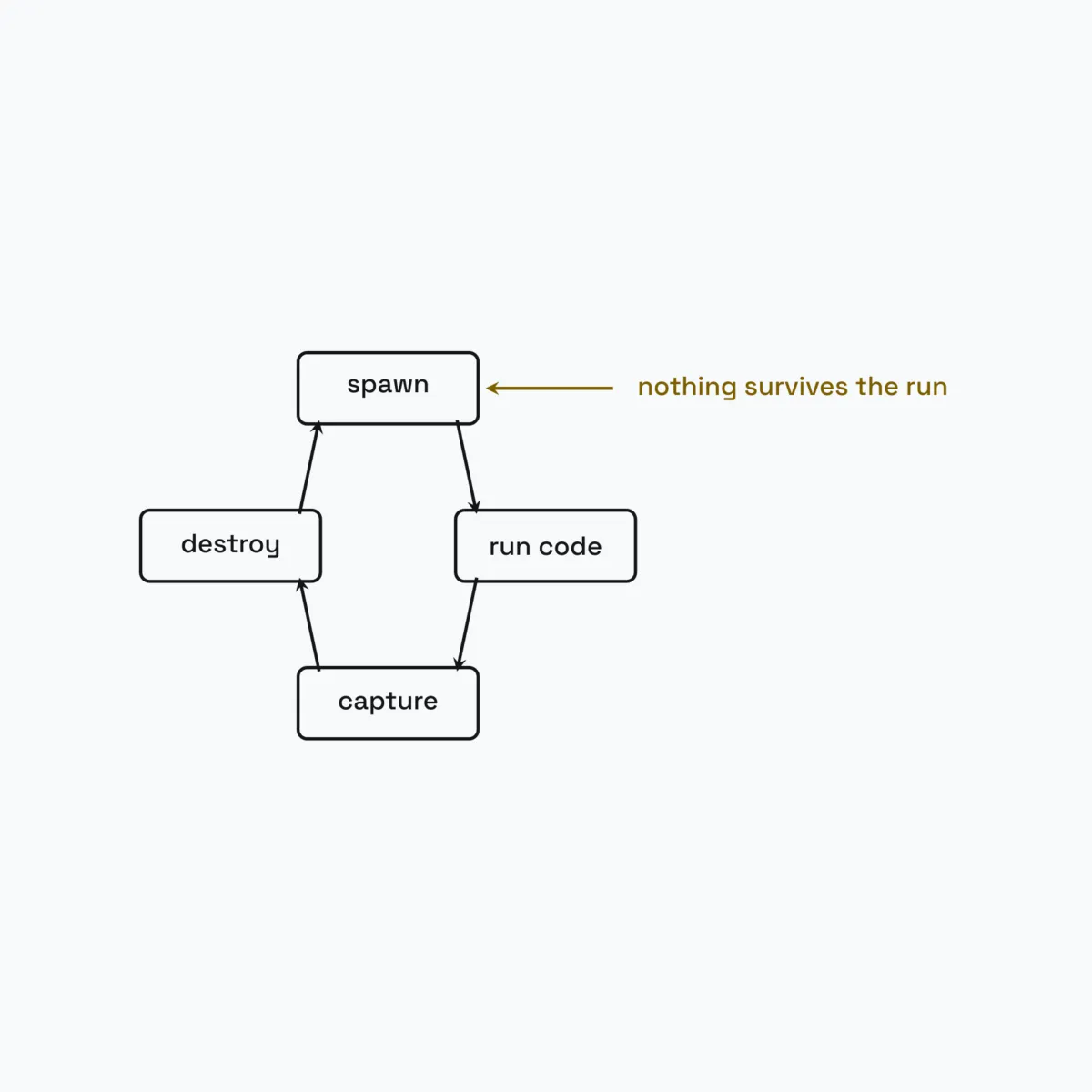
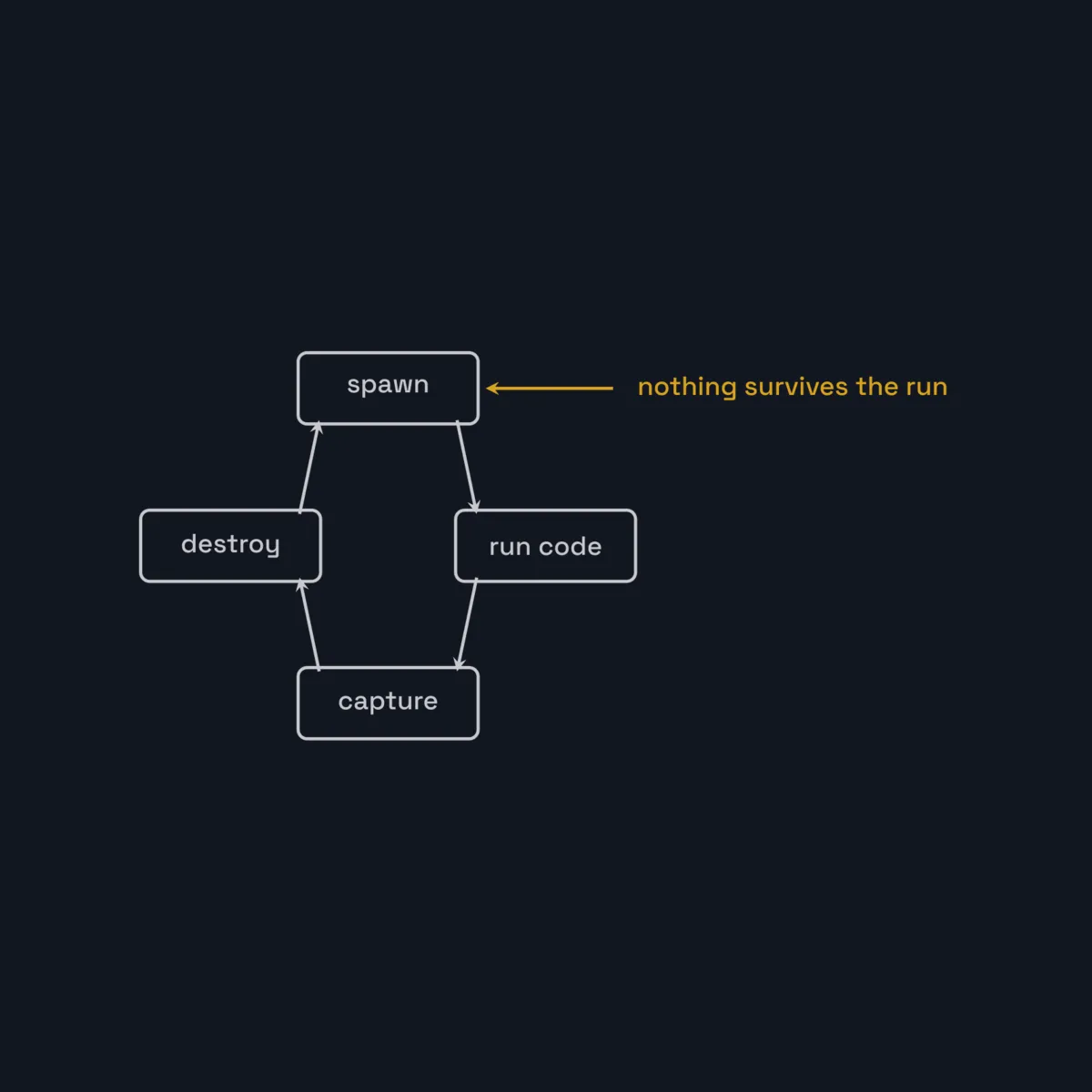
The container is created for one snippet and thrown away. It has no network, a hard memory ceiling, a capped process count, a read-only root, and no Linux capabilities. If the model writes something hostile, the blast radius is a throwaway container with nowhere to go and nothing to steal.
If you’d rather not hand-roll this, llm-sandbox wraps the same idea in a small API, with Docker, Podman, and Kubernetes backends:
from llm_sandbox import SandboxSession

with SandboxSession(lang="python", keep_template=True) as session:
    result = session.run(
        "import numpy as np; print(np.mean([1, 2, 3]))",
        libraries=["numpy"],
    )
    print(result.stdout)  # "2.0"
Capturing results, including plots
Running code is only half of it — you need the output back in a form the model and the user can use. stdout and stderr are easy. Plots are the interesting part: a data agent that can’t show a chart isn’t much of a data agent.
The trick is to run the snippet inside a session that captures matplotlib figures and hands them back as images. llm-sandbox does this when plotting is enabled — the model writes ordinary plotting code and calls plt.show(), and the infrastructure turns the figure into a base64-encoded PNG you can stream into the chat. Conceptually:
# inside the sandbox session, with artifact capture turned on
result = session.run(
    "import matplotlib.pyplot as plt\n"
    "plt.plot([1, 2, 3], [2, 4, 6]); plt.show()"
)
for image in result.plots:        # captured figures
    save_png(image.content_base64)
The model never has to know about your capture mechanism. It writes normal code; the harness handles turning a figure into a displayable artifact.
Defense in depth
The container is the hard boundary, but it shouldn’t be the only one. A small amount of belt-and-suspenders pays off:
-
Constrain the model with the prompt. Tell it which libraries are allowed and what’s off-limits. This keeps it inside the lines before the container would have to stop it — the same “constrain, then verify” instinct I used grounding an LLM’s extracted fields against the source document instead of trusting them outright:
You may use only: pandas, numpy, matplotlib, seaborn, scipy. Never import os, subprocess, socket, or requests. Do not read or write files outside the working directory, and never make network calls. -
Allowlist libraries, don’t blocklist them. Decide what can be installed; reject everything else.
-
Cap code length and execution time. A wall-clock timeout on each run prevents a clever or accidental hang. (Anthropic’s hosted code-execution tool, for instance, enforces a per-cell time limit and returns a timeout result rather than blocking — see the code execution tool docs.)
-
Degrade gracefully. If execution isn’t available — the feature is off, or there’s no Docker socket — return a friendly error instead of crashing the agent. The model should be able to keep answering questions even when it can’t run code.
None of these replace the sandbox. They reduce how often it has to do its job, and they shrink the surface the model can probe.
Don’t want to run your own? Use a managed sandbox
Running disposable containers in production — pooling, scaling, cleaning up — is real work. Several services exist specifically to take it off your hands:
- E2B runs AI-generated code in Firecracker microVMs with a code-interpreter SDK; sandboxes start in well under a second.
- Modal offers serverless sandboxes you can spin up per request.
- Model providers ship their own server-side execution. Anthropic’s code execution tool and OpenAI’s Code Interpreter both run the model’s code in a hosted sandbox and return results and files — no infrastructure on your side at all.
A nice property of building behind a small execute(code) interface is that the backend becomes a swappable detail: run a local container in development, delegate to a provider’s sandbox in production, and the agent code barely changes.
Keeping it fast: a warm pool
One practical wrinkle: cold-starting a container with pandas, numpy, matplotlib, and friends adds seconds of latency to every request. The fix is a pre-warmed pool — create a handful of ready containers at startup, hand one out per request, and reclaim idle ones when traffic drops. You trade a little idle memory for a much snappier interaction, which matters a lot when a user is waiting on a chart.
Why this is worth getting right
This is a recurring shape in modern AI engineering: give a model real computational power without giving it dangerous reach. The durable answers are the same ones that show up across every implementation — disposable containers for isolation, a warm pool for latency, an allowlist plus prompt guardrails for defense in depth, and a backend abstraction so you can run locally or in the cloud without rewriting the agent, the same seam-first instinct behind hiding four different LLM providers behind one interface.
I used exactly this approach to add a code-execution data agent to an internal analytics application, letting it answer open-ended questions with custom charts while staying safely contained. The specifics differ from project to project, but the principles travel — and they’re worth internalizing before you wire a language model up to a Python interpreter.
References and further reading
- llm-sandbox — lightweight Python sandbox runtime (Docker / Podman / Kubernetes) · docs
- E2B — Firecracker-backed sandboxes for AI agents · docs
- Firecracker — lightweight microVMs (the AWS Lambda / E2B substrate)
- gVisor — a user-space kernel for stronger container isolation
- Pyodide — CPython compiled to WebAssembly
- RestrictedPython — in-process Python restriction (a speed bump, not a wall)
- Anthropic sandbox-runtime — OS-level filesystem/network restriction without a container
- Anthropic code execution tool and OpenAI Code Interpreter — hosted, provider-run sandboxes
Working on something in this space, or hiring for it?
Keep reading
- When a model broke containment: what my LLM sandbox actually stopsOpenAI says its models escaped a sandbox and attacked Hugging Face to cheat an eval. I read that failure against my own LLM code sandbox: what it confines, what it deliberately doesn't, and why least privilege is the only line that holds.July 23, 2026
- Mind viruses in multi-agent LLM systems: the memory that persists is the payload that spreadsAn Anthropic-co-authored paper builds self-propagating 'mind viruses' that hop between LLM agents. The infection channel is the persistent memory file I already give my own agents.August 23, 2026
- Plans an Agent Can Actually ExecuteIf you want a language model to carry out a plan, write the plan for a machine: XML-tagged structure, atomic find/replace edits, patterns defined once, and a verification checklist baked in.July 27, 2026
Get the next update by email
Build-in-public updates and new posts, delivered as a digest. Double opt-in · no spam · unsubscribe anytime · handled by Buttondown.