How browser fingerprinting catches your scraper: how to pass the tests
Modern sites fingerprint your whole device: GPU, fonts, timing quirks, not just navigator.webdriver. A stealth Selenium setup passes real detection suites by injecting CDP commands to mask automation tells, spoofing a believable environment, and persisting realistic state. You get past the checks by running the suites against yourself and fixing each failing signal one at a time, where the rules of the site allow it.
If you’ve ever pointed a fresh Selenium script at a modern website and watched it hit a CAPTCHA wall on the first request, you’ve met browser fingerprinting. The frustrating part is that you did everything “right”: a real Chrome binary, a real chromedriver, a real page load, a real UserAgent, and the site still knew, instantly, that no human was there.
That’s because detection moved on. A few years ago, the giveaway was a single JavaScript property. Today, sites build a profile of your device using graphics stack, fonts, timing quirks, the way its automation plumbing leaks through the cracks, and compare it against what a real browser on real hardware looks like.
This post is about what those suites actually measure, and how a carefully built stealth Selenium setup gets past them. It’s also, importantly, about when you’re allowed to do that. So let’s set the boundary up front and come back to it at the end.
What do anti-bot suites actually fingerprint?
A fingerprint is just a bundle of signals that, together, identify a browser closely enough to tell “real person” from “bot.” Roughly, they fall into three layers:
- Automation tells. Flags that only ever appear when a browser is being driven by software —
navigator.webdriver, the$cdc_variables chromedriver injects into the page,--enable-automationswitches, missingchrome.runtime. - Environment fingerprints. What your device looks like: the WebGL vendor and renderer string from your GPU, installed fonts, audio-stack quirks,
navigator.languages, screen and window dimensions, the user-agent. None of these is suspicious alone, but a headless container with a software GPU and no fonts stands out from a laptop. - Behaviour and timing. How the page is used: mouse paths, the cadence of key presses, how fast forms get filled, whether anything moves at all. Pure timing is hard to fake convincingly, which is why it’s increasingly the last line of defence.
Open-source detection libraries make this concrete. BotD from FingerprintJS runs entirely in the browser and looks for exactly these automation markers. CreepJS goes much deeper, cross-checking dozens of signals for the tiny inconsistencies that betray a spoofed environment — its stated purpose is “to shed light on weaknesses and privacy leaks among modern anti-fingerprinting extensions and browsers.” Demo sites like pixelscan.net and deviceandbrowserinfo.com let you see your own fingerprint the way a server would. They’re the test suite. If you want to pass detection, you start by failing their checks and fixing them one at a time.
The cheap tells
The first wave is easy to understand and, fortunately, easy to address. The single most famous signal is navigator.webdriver. Per MDN, this read-only property “indicates whether the user agent is controlled by automation”; the W3C WebDriver spec defines it as returning true “when the user agent is under remote control.” A vanilla automated Chrome returns true. That’s a one-line confession.
You can quiet the obvious ones at launch. Chrome exposes switches that turn off the automation banner and the enable-automation flag:
from selenium.webdriver import ChromeOptions

options = ChromeOptions()
options.add_argument("--disable-blink-features=AutomationControlled")
options.add_experimental_option("excludeSwitches", ["enable-automation"])
Older guides also set useAutomationExtension=False here. I’ve dropped it: the automation extension it disabled was removed from chromedriver years ago, so the option buys nothing, and on recent Chrome it tends to cause more startup errors than it prevents.
That handles the launch flags. But chromedriver also leaves its own calling card inside the browser binary: variables and strings prefixed with $cdc_ that detection scripts probe for directly. The brute-force fix is to patch them out of the chromedriver executable: find the byte sequences and overwrite them so the magic strings simply aren’t there:
import binascii
from pathlib import Path

def remove_cdc(chromedriver_path: str):
    path = Path(chromedriver_path)
    binary = path.read_bytes()
    hex_dump = binascii.hexlify(binary).decode("ascii")

    # '$cdc_' -> 'xydmu': same byte length, so every later offset stays valid
    hex_dump = hex_dump.replace("246364635f", "7879646d75")

    path.write_bytes(binascii.unhexlify(hex_dump))
    path.chmod(0o755)
The key constraint is that the replacement must be the same length as the original, so every other offset in the binary stays valid (Keep a backup of the original driver before you do this). Patch the launch flags and the binary together and you sail past the shallowest checks. BotD’s headless-Chrome detection, for instance, mostly keys off these. But environment fingerprints are still wide open.
Faking a browser’s memory
Here’s where it gets interesting. A real browser carries a lot of state a fresh automation session doesn’t: a consistent user-agent, a believable language list, a plausible GPU, a window that matches a real screen, and, crucially, cookies and localStorage from past visits. A brand-new headless profile looks like someone who has never used the internet, which is itself a tell.
The mechanism for injecting most of this is the Chrome DevTools Protocol (CDP), the same protocol DevTools and Puppeteer ride on. The method that does the heavy lifting is Page.addScriptToEvaluateOnNewDocument, which the protocol describes as evaluating a script “in every frame upon creation (before loading frame’s scripts).” That timing is everything: your patch runs before the page’s own detection code, so by the time the site checks navigator.webdriver, it’s already been redefined.
Selenium’s local Chrome driver has execute_cdp_cmd built in, but the remote WebDriver doesn’t. So if you run against a remote Selenium grid you have to wire the command through yourself. It’s a thin shim over the same endpoint:
def execute_cdp_cmd(self, cmd: str, cmd_args: dict):
    """CDP for a remote WebDriver, which lacks the local driver's helper.

    See the Chrome DevTools Protocol domains/commands reference:
    https://chromedevtools.github.io/devtools-protocol/
    """
    return self.execute(
        "executeCdpCommand", {"cmd": cmd, "params": cmd_args}
    )["value"]
With CDP available, you can override each fingerprint surface. Rather than hand-roll every patch, selenium-stealth, a Python port of the well-known puppeteer-extra stealth plugin, bundles a battery of them: it spoofs navigator.webdriver, the language list, the plugin array, the WebGL vendor/renderer, the permissions API, and more. Each one is a small script injected on every new document.
A caveat: selenium-stealth and the puppeteer-extra plugin it ports are now essentially unmaintained, and modern enterprise anti-bot (Cloudflare, DataDome) flags them on sight. I lean on it here because each patch is a readable script that makes the mechanism legible. For production in 2026 you’d reach instead for undetected-chromedriver, nodriver, or SeleniumBase’s UC mode (they automate exactly the principles below).
The navigator.languages patch is representative of the whole genre — redefine the property with a getter so it returns a believable value instead of the automation default:
// Redefine navigator.languages with a custom getter, injected on every
// new document via Page.addScriptToEvaluateOnNewDocument.
(languages) => {
  Object.defineProperty(Object.getPrototypeOf(navigator), 'languages', {
    get: () => languages || ['en-US', 'en']
  })
}
The other half of “memory” is persistence. Cookies and localStorage are what make a returning visitor look returning. A simple JSON-backed profile store lets you snapshot a profile’s state and reload it on the next run, so the browser shows up with history instead of as a blank slate:
import json
from pathlib import Path

class ProfileStorageBackend:
    """Persists per-profile cookies / localStorage as JSON on disk."""

    def __init__(self, base_path: Path = None):
        self.json_path = (base_path or Path(".")) / "profiles.json"
        self.json_data = (
            json.loads(self.json_path.read_text())
            if self.json_path.is_file() else {}
        )

    def get_profile(self, name: str, default=None):
        return self.json_data.get(name, default)

    def set_profile(self, name: str, data: dict) -> None:
        self.json_data[name] = {"profile_id": name, **data}
        self.json_path.write_text(json.dumps(self.json_data, indent=4))
Point Chrome at a persistent --user-data-dir and a named --profile-directory, hydrate that directory from your store, and the session carries real cookies and localStorage between runs. To a fingerprinting suite, that’s the difference between a tourist and a regular.
Tie it together and the driver factory does, in order: build Chrome options with the automation flags stripped, patch the chromedriver binary, attach a persistent profile, then inject the stealth scripts over CDP before the first navigation:
# Apply selenium-stealth's patches over CDP after the driver is built.
from selenium_stealth import (
    navigator_webdriver, navigator_languages, navigator_vendor,
    webgl_vendor_override, user_agent_override,
)

navigator_webdriver(driver)
navigator_languages(driver, ["en-US", "en"])
navigator_vendor(driver, "Google Inc.")
webgl_vendor_override(driver, "Intel Inc.", "Intel Iris OpenGL Engine")
user_agent_override(driver, ua_languages="en-US,en")
That example also hides a trap worth naming: Intel Iris OpenGL Engine is a macOS renderer string, so handing it to a site from a Linux container, alongside a Linux user-agent, is precisely the cross-signal mismatch CreepJS exists to catch. Whatever you spoof, the values have to agree with one another. Consistency, not any single value, is the real game.
Isolating with Selenoid
Running stealth Chrome on your laptop is fine for development, but at any scale you want each session in its own disposable, identical container, both for cleanliness and because a consistent, real-looking environment is itself part of the fingerprint — the same disposable-container instinct I leaned on later for running LLM-generated code safely, just isolating a browser session instead of a Python snippet. Selenoid from Aerokube is built for exactly this: it launches a fresh browser container per session over the standard Selenium protocol, managed by a small config file. (A 2026 caveat: Selenoid is now in maintenance-only mode and Aerokube steers new deployments to its Kubernetes-native successor, Moon — but the per-session-container pattern shown here is identical.)
The wrinkle is headless detection. A naive headless container fails on a software GPU, missing fonts, and a giveaway user-agent. Selenoid’s VNC browser images run a real Chrome inside a virtual framebuffer (Xvfb) instead of headless mode, which sidesteps a whole class of “is this headless?” checks. Chrome’s newer --headless=new mode (since Chrome 112) runs the full browser and closed much of that gap, but a real display still leaks fewer headless tells, so the Xvfb route stays the more conservative choice. The container’s entrypoint sets up the display, then launches chromedriver with the automation features disabled — and patches the $cdc_ markers out of the in-container driver the same way we did locally:
#!/bin/bash
DISPLAY_NUM=99
export DISPLAY=":$DISPLAY_NUM"

# Real Chrome inside a virtual framebuffer — not true headless.
xvfb-run -l -n "$DISPLAY_NUM" -s "-screen 0 1920x1080x24" fluxbox &

# Strip chromedriver's '$cdc_' markers in-place (same-length replacement).
xxd -p /usr/bin/chromedriver | tr -d '\n' > driver.hex
sed -i 's/246364635f/7879646d75/g' driver.hex
xxd -r -p driver.hex > /usr/bin/chromedriver
chmod +x /usr/bin/chromedriver

chromedriver --port=4444 --allowed-origins='*' \
  --disable-blink-features=AutomationControlled \
  --disable-infobars --no-sandbox --disable-dev-shm-usage &
wait
A browsers.json tells Selenoid which image to spin up, with a tmpfs mount so each session’s scratch space lives in RAM and vanishes when the container dies:
{
  "chrome": {
    "default": "chrome_127.0",
    "versions": {
      "chrome_127.0": {
        "image": "weberist-chrome_127.0",
        "port": 4444,
        "tmpfs": { "/tmp": "size=512m" },
        "path": "/"
      }
    }
  }
}
Your client connects to Selenoid’s endpoint with remote=True, which is why that execute_cdp_cmd shim from earlier matters — the remote driver needs it to inject the stealth scripts.
Did it work?
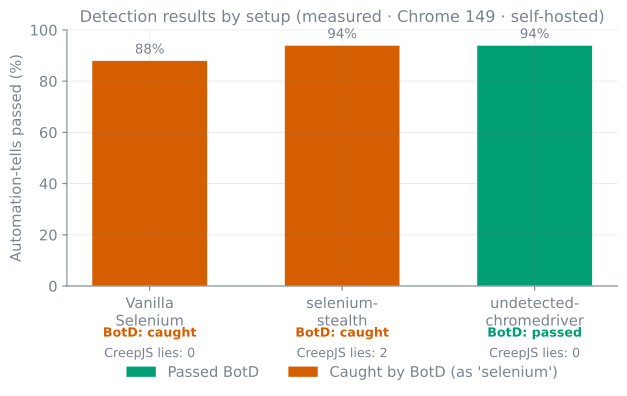
So I measured it. I stood up the open-source detectors locally — BotD (FingerprintJS) and CreepJS — and ran three setups against them on 2026-06-29 with Chrome 149, headful on a real display: stock Selenium (“vanilla”), selenium-stealth, and undetected-chromedriver. Alongside the two suites I scored a panel of 17 of the concrete automation tells described above (navigator.webdriver, $cdc_ props, plugins, WebGL renderer, productSub, and so on). Three trials each; the numbers were stable across all three.
The shape surprised me. On a real display, vanilla Selenium already passes ~88% of the tells panel — the environment (GPU, fonts, plugins, languages) is genuinely real, so the only things it trips are the explicit automation flags: navigator.webdriver and the $cdc_ markers. selenium-stealth pushes the panel to 94% by spoofing the JS surface — and yet BotD still catches it as selenium. Because it never strips the $cdc_ markers from the driver binary, and that’s exactly what BotD keys on. Worse, its getter-based spoofing introduces two CreepJS lies that vanilla didn’t have: naive spoofing can make you more detectable to deep fingerprinting, not less.
Only undetected-chromedriver passes BotD outright — and it does it precisely by patching the driver binary, the $cdc_ surgery this post opened with. That’s the whole argument in one measurement: the JS-surface score (94% either way) tells you almost nothing; whether the binary markers are gone is what flips BotD from “caught” to “passed.”
A caveat I can’t repeat often enough: this is one environment, one day, one IP — a snapshot, not a guarantee. CreepJS’s headline “trust score” isn’t even in the chart, because it’s computed by CreepJS’s own API and a self-hosted copy can’t reach it; what you see is its local lie count. Detection evolves; a setup that passes today can fail next month. The harness that produced these numbers lives in the repo, so they’re at least reproducible — I later turned that harness into a proper, versioned benchmark that scores stealth configs against these same self-hosted detectors and commits every run, over in stealthbench.
There’s also a deeper tell the setup above doesn’t touch: talking to the browser over CDP at all leaves marks. Since DataDome went public about it in 2024, anti-bot vendors watch for the Runtime.enable CDP command — which Selenium, Puppeteer and Playwright all issue — along with the artifacts CDP leaves in error stack traces and property descriptors. That’s a tell baked into how the automation talks to the browser, not into any single fingerprint surface, which is why the current generation of tools (rebrowser-patches, Patchright, nodriver) work at the source level to avoid Runtime.enable entirely. The CDP-injection approach in this post predates that step in the arms race — a good reminder that “passes the suite” is always a snapshot, never a finish line.
Ethics and the rules of the road
Everything above is dual-use, so let’s be plain about the line. These techniques are for legitimate automation and testing — QA against your own apps, monitoring sites you operate, accessibility checks, research, and scraping of public data where you’re permitted to do so. They are not a license to ignore the wishes of the sites you visit.
Concretely, that means:
- Respect
robots.txtand the Terms of Service. If a site disallows automated access to a path, don’t bypass it because you technically can. Defeating a fingerprinting check is not consent. - Rate-limit yourself. Crawl politely — modest concurrency, real delays, off-peak when possible. Fingerprinting is partly a defence against load; don’t validate it by hammering the server. It’s a different flavor of hostility than a site that simply falls over under load rather than trying to detect you, which is the failure mode I had to survive in scraping a fragile legacy site into a clean time series.
- Don’t defeat access controls or scrape personal/private data. Anti-bot systems often protect logins, paywalls, and PII. Stealth tooling should never be used to get at things behind a real access boundary.
- Know your jurisdiction. The legality of scraping varies, and ToS can be contractually binding. When in doubt, ask, use an official API, or don’t.
The honest framing is that fingerprinting evasion is a tool for making authorized automation behave like a normal user — not a way to take what a site has decided not to give you.
Where I used this
I built this stealth-driver-plus-Selenoid setup into weberist, my own web-automation toolkit, to run reliable authorized automation against sites whose anti-bot layers would otherwise trip on a stock Selenium session. The principles travel further than the code: detection is about consistency, so the durable wins come from removing the obvious automation tells, presenting a coherent and persistent environment, and — above all — staying on the right side of what each site has agreed to allow.
References and further reading
navigator.webdriver— MDN and the W3C WebDriver spec — the property that reports automation- BotD — FingerprintJS’s open-source, in-browser bot detection library
- CreepJS — a deep browser-fingerprinting / anti-fingerprinting research tool
- Chrome DevTools Protocol — the protocol behind
execute_cdp_cmd, includingPage.addScriptToEvaluateOnNewDocument - selenium-stealth (PyPI) — a Python port of the puppeteer-extra stealth patches (now largely unmaintained and widely detected — used here to make the mechanism legible)
- undetected-chromedriver and nodriver — current-generation, more thoroughly patched successors to selenium-stealth
- rebrowser-patches — source-level patches (with Patchright) that avoid the
Runtime.enableCDP tell - DataDome — how new headless Chrome and the CDP signal affect bot detection — the public write-up of CDP-based detection
- Selenoid — Aerokube’s per-session browser-in-Docker grid (maintenance-only; see Moon for new deployments)
Working on something in this space, or hiring for it?
Keep reading
- Scraping a fragile legacy site into a clean time seriesPulling years of monthly vehicle prices from a flaky legacy ASP site is a resilience problem: checkpoint and resume, handle modal dialogs, retry hard, and land the result as clean columnar data you can actually analyze.June 27, 2026
- Sanitising is not identifying: deriving a filename from untrusted data without collisionsYou take a title and an id from a remote API and build a filename out of them. Sanitising the title is right. Sanitising the id is what makes two different items overwrite each other, because sanitising is lossy on purpose and an identifier has to survive intact. Five real collisions, percent-encoding as the fix, and the six bytes of a 255-byte budget that are not in the name at all.October 15, 2026
- Rendering my own blog diagrams as code: brand-themed TikZ with LuaLaTeXThe figures in these posts aren't drawn by hand. They're generated by bessaviz, a small TikZ/LuaLaTeX library with my brand palette baked in: version-controlled, regenerable, and dark-mode for free. This post is illustrated with it.August 22, 2026
Get the next update by email
Build-in-public updates and new posts, delivered as a digest. Double opt-in · no spam · unsubscribe anytime · handled by Buttondown.