Scraping a fragile legacy site into a clean time series
Some data is only available through a website that was clearly never meant to be read by a program. No API, no bulk download, no CSV export — just a form, a dropdown, a search button, and a table that appears after a spinner. If you want the data as a dataset, you have to drive the page like a human and scrape what comes back.
That’s fine for a handful of rows. It gets interesting when you need years of them — a different kind of hostile from a site actively trying to detect and block you, the problem I wrote about in beating browser fingerprinting; this site just falls over. I wanted the full monthly history of the public Brazilian vehicle price table (FIPE — Fundação Instituto de Pesquisas Econômicas), broken down by brand, model, and year, across every reference month the site still served. That’s tens of thousands of lookups against a legacy ASP site that times out, throws modal dialogs, and occasionally just stops responding. A naive loop would die somewhere in hour two and lose everything.
This post is about how to make that kind of scrape survivable: how to checkpoint so a crash costs you minutes instead of hours, how to deal with the modal dialogs a legacy site throws at you, how to retry hard without giving up, and how to land the result as clean columnar data you can analyze instead of a pile of half-broken HTML.
When the site fights back
The site I was scraping is a classic of the genre. You pick a reference month from a dropdown, type a FIPE code into a text field, the page fires an AJAX request, a second dropdown populates with the matching model-years, you pick one, hit search, and a result table renders. Repeat for the next code. Repeat for the next month.
Three things make this hostile to automation:
- It’s stateful and slow. Every step depends on the previous one having finished. The model-year dropdown is empty until the AJAX call for the code you typed comes back, and that call can take a few hundred milliseconds or a few seconds depending on the server’s mood.
- It throws modal dialogs. Ask for a code that doesn’t exist in the selected month and you don’t get an empty result — you get a modal alert that sits on top of the page and blocks every other interaction until you dismiss it. Miss it, and your next click lands on the overlay instead of the control you wanted.
- It falls over. Run thousands of requests in a row and you’ll hit timeouts, refused connections, and the occasional stale element. Not often enough to be useless; often enough that “just let the loop run” is not a plan.
So the design goal is narrow: finish the job despite the site, and don’t lose progress when it breaks. Everything below is in service of that.
Checkpointing: make the scrape idempotent
The single most important decision is that the scrape must be resumable. If it dies on row 9,000 of 27,000, restarting it should pick up at row 9,001 — not row 1, and not by re-downloading everything to find out where it stopped.
The trick is to make the output file itself the checkpoint. Each reference month writes to its own parquet file, and rows are appended in the same order as a stable list of FIPE codes. On startup, for each month, I read whatever is already on disk, look at the last code I successfully wrote, find that code’s position in the master list, and resume from the next one:
overwrite = True
# resume from where the last run left off
try:
    data = pd.read_parquet(data_file, engine="pyarrow")
    last_code = data["codigo_fipe"].values[-1]
    for row, idx in zip(fipe_codes.values, fipe_codes.index):
        if row[0] == last_code:
            start = idx + 1
    overwrite = False
except (FileNotFoundError, EmptyDataError):
    start = 0

for code, modelo, marca in fipe_codes.values[start:]:
    ...
There’s no separate state file, no database, no “progress.json” to keep in sync with reality. The data is the progress. If the parquet exists, the last row in it is the high-water mark; if it doesn’t, we start from zero. That property — that re-running produces the same result without redoing finished work — is idempotency, and it’s the thing that turns a fragile multi-hour job into one you can kill and restart without a second thought. It’s the same property I later had to design for on a schedule instead of a crash, in idempotent monthly resets with Celery Beat.
A couple of details matter for this to actually be safe:
- Order has to be stable. The resume logic only works because the list of codes is read from a fixed file (
fipe_codes_carros.csv) in the same order every run. If the iteration order changed between runs, “the last code I wrote” would tell you nothing about what’s left. - Catch the empty case. A freshly created but empty file raises
EmptyDataError, notFileNotFoundError. Treating both as “start from zero” avoids a crash-on-resume that would otherwise look like the data being corrupt.
Modals, waits, and retries
With resumption in place, the loop only has to survive long enough to make progress between crashes. That comes down to handling the page’s three failure modes.
Dismiss the modal, then continue
When a requested code doesn’t exist for the selected month, the site pops a modal alert instead of returning an empty table. The fix is to detect it, read its message, close it, and move on to the next code rather than letting the blocked overlay derail everything that follows:
try:
    modelos = crawler.items_of(select_modelo)
except ElementClickInterceptedException:
    # the code may not exist for this reference month
    alert = crawler.element(".modal.alert", "css selector")
    message = crawler.child_of(alert, ".content.ps-container", "css selector")
    block = crawler.child_of(message, "p", "tag name")
    text = block.get_attribute("innerText")
    if "não localizado" in text:
        crawler.click("btnClose", "class name")
        time.sleep(2)
        continue
The ElementClickInterceptedException is the tell: Selenium tried to interact with a control and something — the modal overlay — got in the way. Catching that specific exception and inspecting the dialog text lets the scraper distinguish “this code legitimately doesn’t exist this month” (skip it) from a real failure (let it bubble up).
Wait for the page, don’t sleep blindly
A legacy AJAX page is the textbook case for explicit waits. The wrong move is a fixed sleep long enough to cover the worst case — that’s slow when the server is fast and still flaky when it’s slow. The right move is to poll for the condition you actually care about and proceed the moment it’s true. Selenium’s WebDriverWait does exactly this:
from selenium.webdriver.support.ui import WebDriverWait
from selenium.webdriver.support import expected_conditions as EC
from selenium.webdriver.common.by import By

# wait until the result table is actually present, up to 10s
wait = WebDriverWait(driver, 10)
table = wait.until(
    EC.presence_of_element_located((By.TAG_NAME, "table"))
)
An explicit wait is “loops added to the code that poll the application for a specific condition,” as the Selenium docs put it — it returns as soon as the table exists, and raises TimeoutException if it never does. That timeout is a feature: it’s the signal that tells the outer loop the page is wedged and the crawler should be restarted.
Retry hard at the top level
Individual waits handle a slow page. They don’t handle the crawler process getting into a bad state — a dropped connection, a browser that stops responding. For that, the whole scrape runs inside a bounded retry loop that catches the transient exceptions, rebuilds the crawler, and tries again, with a finite budget so a permanently-broken site can’t spin forever:
trials = 100
keep_on = True
while keep_on:
    crawler = thatscraper.Crawler(headless=True, quit_on_failure=False)
    crawler.timeout = 10
    try:
        keep_on = get_fipe_carros(crawler, data_file, fipe_codes_file)
    except TimeoutException as err:
        if trials > 0:
            print("Timeout. Restarting crawler...")
            trials -= 1
        else:
            keep_on = False
    except (ConnectionRefusedError, MaxRetryError) as err:
        if trials > 0:
            print("Connection refused. Restarting crawler...")
            time.sleep(5)
            trials -= 1
        else:
            keep_on = False
    finally:
        crawler.quit()
Two things make this work together with the checkpoint logic. First, a fresh crawler is built on every iteration, so a wedged browser is thrown away rather than reused. Second — and this is the payoff for all the checkpoint work — when get_fipe_carros restarts, it reads the parquet files back and resumes from the last code it wrote. A crash on trial 12 doesn’t cost the work from trials 1 through 11. The retry budget (trials) bounds the total damage a permanently-down site can do, so the job fails loudly instead of hanging forever.
If you’d rather not hand-roll the retry bookkeeping, tenacity wraps the same pattern — bounded attempts, exponential backoff, jitter — in a decorator. The principle is identical: retry the transient stuff, cap the attempts, and make sure each retry resumes from a checkpoint rather than starting over.
Landing a clean time series
Scraping gets you HTML. Analysis needs a table. The bridge is short and worth getting right, because the shape you land the data in determines how painful every later step is.
Each rendered result table goes straight from its HTML into a DataFrame with pandas.read_html, which parses an HTML <table> into a list of frames:
table_element = crawler.element("table", "tag name")
to_table = pd.read_html(table_element.get_attribute("outerHTML"))
header = extract_clean_header(to_table)   # strip accents, lowercase, snake_case
values = extract_values(to_table)
search_result = make_dataframe(values, header)
Then comes the cleaning that turns scraped strings into typed columns. The prices arrive as Brazilian-formatted currency text — R$ 45.046,00, with a dot for thousands and a comma for decimals — which is a string, not a number, until you fix it. A single regex pass per column handles it:
# "R$ 45.046,00" -> 45046.00
main["preco_medio"].replace(
    regex={r"(R\$\s)": "", r"\.": "", r",": "."},
    inplace=True,
)
main[["preco_medio"]] = main[["preco_medio"]].astype("float")
The goal of this step is tidy data in Hadley Wickham’s sense: each variable a column, each observation a row, one type of observational unit per table. A scraped page is the opposite — values fused into display strings, headers carrying accents and punctuation, types implied rather than stated. Pulling those apart now means every downstream query is a one-liner instead of a parsing exercise, the same instinct for real, typed columns over a pile of stringly-typed fields that shaped how I modeled a polymorphic vault in Django REST Framework.
Finally, the result lands as Apache Parquet rather than CSV. Parquet is a columnar format: it stores types, compresses well, and reads fast when you only need a couple of columns out of many — which is exactly the access pattern for “average price over time by brand.” Writing and reading it from pandas is one call each:
table.to_parquet(data_file, engine="pyarrow", index=False)
df = pd.read_parquet(data_file, engine="pyarrow", columns=["marca", "preco_medio"])
That columns= argument is the columnar payoff: reading two columns out of eight touches only those two columns on disk. For a multi-file historical dataset you scan repeatedly while exploring, that adds up.
What the data shows
Once every month is a tidy parquet file, the analysis is the easy part. Reading all of them, parsing the prices, and taking the median price per brand per reference month gives a clean monthly time series spanning August 2020 to January 2023 — 30 reference months, assembled from the scraped tables.
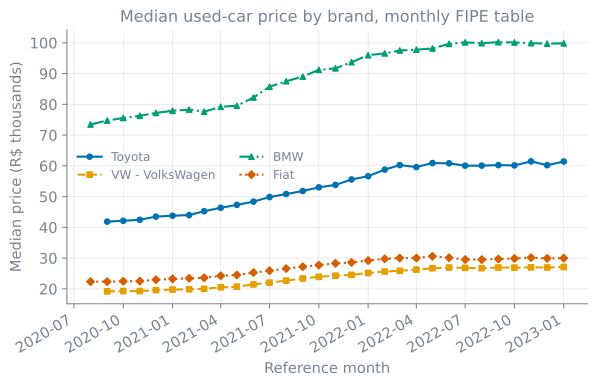
The trend is unmistakable and consistent across segments: every brand I tracked rose between roughly 34% and 47% over the window, with the steepest climb through 2021 — the period of the global used-car price surge. I use the median rather than the mean here on purpose: the raw data has a long right tail (a handful of collector cars priced in the millions of reais) that would drag a mean around month to month. Median per brand per month is the robust summary, and it’s a one-line groupby once the data is tidy.
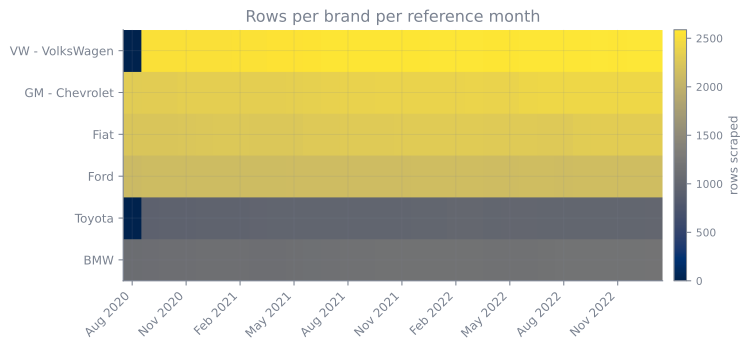
It’s also worth auditing completeness. A scrape that ran for hours never lands perfectly square — some brand/month cells are richer than others, and a thin month is a hint that the run was interrupted there. A quick heatmap of rows per brand per month makes gaps visible at a glance:
Both charts are generated by self-contained scripts that read the scraped parquet files directly; if the files aren’t present they fall back to a clearly-labelled synthetic series, so the plots reproduce from a clean checkout.
Why this shape keeps coming back
Strip away the specifics and this is a pattern you’ll meet again any time you pull data from a source that wasn’t built to give it to you:
- Make the job idempotent. Use the output as the checkpoint so a restart resumes instead of redoing. This is the single highest-leverage decision in a long scrape.
- Wait for conditions, not clocks. Explicit waits are faster and more robust than fixed sleeps, and their timeouts double as your “the page is wedged” signal.
- Retry the transient, bound the attempts. Rebuild the worker on each retry, cap the total, and fail loudly rather than hanging.
- Land tidy, columnar data. Do the string-to-type cleaning once, store it as parquet, and every later analysis is a one-liner.
I used exactly this approach to assemble a multi-year history of the public FIPE vehicle price table — tens of thousands of rows scraped from a legacy ASP site that timed out constantly — into a set of clean monthly parquet files I could query in seconds. The site fought back the whole way; the checkpointing meant it never actually won.
References and further reading
- Selenium — Waiting Strategies — official docs on explicit waits (
WebDriverWait, expected conditions) vs. implicit waits - tenacity — general-purpose Python retry library with bounded attempts, exponential backoff, and jitter
- pandas
read_parquet— reading Parquet into a DataFrame, including column projection - pandas
read_html— parsing HTML tables straight into DataFrames - Apache Parquet documentation — the columnar storage format and why it reads fast for column-subset queries
- Hadley Wickham, “Tidy Data” — Journal of Statistical Software 59(10), the canonical definition of tidy data
- FIPE — Tabela de preços médios de veículos — the public Brazilian vehicle price table this data comes from
Working on something in this space, or hiring for it?
Keep reading
- How browser fingerprinting catches your scraper: how to pass the testsModern sites fingerprint the device and timing, not just navigator.webdriver. Here's how a stealth Selenium setup injects CDP commands, masks automation markers, and persists realistic state to pass real detection suites.June 29, 2026
- Sanitising is not identifying: deriving a filename from untrusted data without collisionsYou take a title and an id from a remote API and build a filename out of them. Sanitising the title is right. Sanitising the id is what makes two different items overwrite each other, because sanitising is lossy on purpose and an identifier has to survive intact. Five real collisions, percent-encoding as the fix, and the six bytes of a 255-byte budget that are not in the name at all.October 15, 2026
- Rendering my own blog diagrams as code: brand-themed TikZ with LuaLaTeXThe figures in these posts aren't drawn by hand. They're generated by bessaviz, a small TikZ/LuaLaTeX library with my brand palette baked in: version-controlled, regenerable, and dark-mode for free. This post is illustrated with it.August 22, 2026
Get the next update by email
Build-in-public updates and new posts, delivered as a digest. Double opt-in · no spam · unsubscribe anytime · handled by Buttondown.