Django Channels: database_sync_to_async and the ORM in async consumers
Most of what we build on the web is request/response: the browser asks, the server answers, the connection closes. It’s the model Django was built around, and it has one stubborn limitation: the server can never speak first. If something happens that a user should see right now (a chat message from someone else, a job finishing, a price ticking), plain HTTP has no way to tell the browser. The browser has to ask.
The classic workaround is to keep asking: poll the server every few seconds and hope the news is fresh. That’s wasteful, slow, and never feels live. This post is about the alternative, a persistent two-way connection, and how Django Channels bolts it onto an otherwise ordinary Django app.
Why request/response can’t push
Django can’t push because of the interface underneath it. Classic Django runs under WSGI: as the ASGI docs put it, “a single, synchronous callable that takes a request and returns a response.” One request in, one response out, done. There is no place in that contract for the server to hold a line open and speak again later; the ASGI introduction says plainly that the “single-callable interface just isn’t suitable for more involved Web protocols like WebSocket.”
So if you want push, you poll, and polling’s latency is structural: an event that happens just after a poll waits for the next one before anyone sees it. Crank the interval down and you flood the server with mostly-empty requests; crank it up and the app feels sluggish.
ASGI, the Asynchronous Server Gateway Interface, is the “spiritual successor to WSGI” that reshapes the contract: an application is an async callable handed a scope (what kind of connection is this), a receive (pull the next incoming event), and a send (push one out). Many events, both directions, over one long-lived connection: exactly what a WebSocket needs. Django can be deployed under ASGI, and Channels is the library that builds WebSockets on top of that.
Consumers and the channel layer
Channels gives you two pieces. The consumer is the WebSocket equivalent of a view: you subclass AsyncWebsocketConsumer and fill in connect, receive (one call per frame), and disconnect. The consumers docs describe the design as structuring your code “as a series of functions to be called whenever an event happens, rather than making you write an event loop.”
The channel layer is a shared message bus, usually Redis, that lets consumers in different processes and on different machines talk to each other. This is plain publish/subscribe: a consumer subscribes a connection to a named group, and anything published to the group fans out to every subscriber. One browser’s message arrives at one consumer instance; for every other browser to see it, that consumer has to publish it through the layer.
Here’s the connect method from a chatbot I built. When a socket opens, it accepts the connection and joins a named group, so it’s now a subscriber to anything broadcast there:
class AsyncChatConsumer(AsyncWebsocketConsumer):

    group_name = CHAT_GROUP_NAME

    async def connect(self):
        await self.accept()
        await self.channel_layer.group_add(
            self.group_name, self.channel_name
        )
        # ... load history and greet the client ...

    async def disconnect(self, close_code):
        await self.channel_layer.group_discard(
            self.group_name, self.channel_name
        )
self.channel_name is this specific connection’s unique address; group_add adds it to the group. The symmetry matters: whatever you add in connect, you remove in disconnect with group_discard, or you leak dead connections into the group and keep trying to send to sockets that closed long ago.
Broadcasting to a group
The payoff is in receive. When a client sends a message, the consumer doesn’t reply directly. It hands the message to the channel layer with group_send, and the layer delivers it to every member of the group:
async def receive(self, text_data):
    data = json.loads(text_data)
    response = "FAILED"
    model = ''
    if "chat" in data:
        message = data["chat"]["message"]
        model = data["chat"]["model"]
        response = await self.chat.ask(message, model=model)
    await self.channel_layer.group_send(
        self.group_name, {
            "type": "notify.client",
            "data": {
                "response": {"message": str(response)},
                "model": model if model else 'Bot',
            },
        }
    )

async def notify_client(self, event):
    await self.send(json.dumps({"chat": event["data"]}))
The clever bit is "type": "notify.client". The layer delivers that event to each consumer in the group, and the consumer’s dispatcher swaps the dot for an underscore and calls the method of that name, notify_client, on its own instance. Each consumer then does its own self.send(...) over its own socket: one inbound message, an outbound message to everyone connected. It’s also why you can’t just await self.send() from inside receive; that would answer only the one client who spoke. The round-trip through the layer is what reaches the rest.
On the browser side there’s nothing exotic; the native WebSocket API is a few lines:
const socket = new WebSocket(`wss://${location.host}/ws/chat/${uuid}/`);

socket.addEventListener("open", () => {
  socket.send(JSON.stringify({ chat: { message: "hello", model: "gpt" } }));
});

socket.addEventListener("message", (event) => {
  const { chat } = JSON.parse(event.data);
  renderMessage(chat); // the server pushed this; no request was made
});
That message handler fires whenever the server pushes, with no request on the client’s part.
The sync/async ORM boundary
There’s a trap waiting inside every async consumer. Your consumer methods are async, but Django’s ORM is not. The Channels database docs are blunt about it: “The Django ORM is a synchronous piece of code,” and calling it directly from async code can corrupt connection state. Django’s own ASGI guide repeats the rule: “Do not call blocking synchronous functions or libraries in any async code.”
Django enforces it too. The ORM is one of the pieces classified as async-unsafe: “If you try to run any of these parts from a thread where there is a running event loop, you will get a SynchronousOnlyOperation error.” That is the friendliest failure in this whole area, because it fires immediately and names itself.
The fix is database_sync_to_async, “a version of asgiref.sync.sync_to_async that also cleans up database connections” when it’s done. Wrap any ORM access in it, as a decorator or inline, and it runs the query in a thread and hands the result back to your coroutine:
from channels.db import database_sync_to_async

@database_sync_to_async
def get_chat(self):
    return ContextChat.objects.get(
        uuid=self.scope["url_route"]["kwargs"]["uuid"]
    )
Now await self.get_chat() is safe inside connect or receive. The mental model: the consumer lives in the async world, the ORM in the sync world, and database_sync_to_async is the one door between them.
What database_sync_to_async adds to sync_to_async
channels/db.py is short enough to read in one sitting, and the class doing the work fits on seven lines:
class DatabaseSyncToAsync(SyncToAsync):
    def thread_handler(self, loop, *args, **kwargs):
        close_old_connections()
        try:
            return super().thread_handler(loop, *args, **kwargs)
        finally:
            close_old_connections()
That’s the entire difference from sync_to_async. It subclasses it and sandwiches the call between two close_old_connections() calls, so cleanup happens on the way in as well as on the way out. close_old_connections drops connections that have passed CONN_MAX_AGE or gone unusable, which in a normal Django app happens for free at the start and end of every request.
A WebSocket has no requests. It opens, and then it sits there. Channels patches part of that gap: it “will automatically call Django’s close_old_connections method when a new connection is started, when a connection is closed, and whenever anything is received from the client.”
Read that list again for what is missing. Sending isn’t on it, and the docs say why: “Connections are not automatically closed when sending data from a consumer since Channels has no way to determine if this is a one-off send (and connections could be closed) or a series of sends (in which closing connections would kill performance).”
So a consumer that mostly listens is covered. A consumer that mostly pushes, a progress feed, a dashboard tile on a timer, a job-status stream, can run for hours without ever hitting a cleanup point, holding a connection that the database or the pooler may have closed underneath it. Channels ships aclose_old_connections for exactly that, and the docs don’t hedge: “When using a long-lived AsyncConsumer that calls the Django ORM it is important to call this function periodically.”
thread_sensitive, and why the default is what it is
DatabaseSyncToAsync inherits sync_to_async’s signature, including thread_sensitive=True. Django documents both settings plainly:
thread_sensitive=True(the default): the sync function will run in the same thread as all otherthread_sensitivefunctions.
thread_sensitive=False: the sync function will run in a brand new thread which is then closed once the invocation completes.
Under an async server, “the same thread” means one shared sub-thread for the whole process. Every wrapped ORM call from every consumer queues through it. That sounds like a bottleneck, and it is, but the alternative is worse: Django keeps one connection per thread, “since each thread maintains its own connection, your database must support at least as many simultaneous connections as you have worker threads.” Flip thread_sensitive=False on a hot consumer path and every call gets a brand new thread, therefore a brand new connection, opened and torn down per query. asgiref’s own README is short about the risk: make sure your code “does not rely on anything bound to threads (like database connections)” before you disable it.
The practical consequence is one I’d rather know up front than find under load: with the default, a slow query in one consumer serializes ORM access for every consumer in that process. The same queue that keeps connection handling safe is what caps throughput. If a consumer needs to do something genuinely slow with the database, the fix is to make the query fast or hand it to a task queue, not to spin it onto its own thread.
Transactions do not cross the boundary
“The ORM works if you wrap it” invites the assumption that all of the ORM works if you wrap it. It does not. From Django’s async documentation:
Transactions do not yet work in async mode. If you have a piece of code that needs transactions behavior, we recommend you write that piece as a single synchronous function and call it using
sync_to_async().
The queries docs say the same thing with the error attached: “Transactions are not currently supported with asynchronous queries and updates. You will find that trying to use one raises SynchronousOnlyOperation.”
Which rules out the shape a lot of consumer code drifts into. Two awaited calls are two transactions, whatever the surrounding code looks like:
# Two awaits, two autocommits. If the second one raises,
# the first is already committed and there is no going back.
await self.save_message(text)
await self.bump_unread_count()
The atomic block has to live entirely inside one wrapped function, so the whole unit of work crosses the door once:
from django.db import transaction
from django.db.models import F

@database_sync_to_async
def record_message(self, text):
    with transaction.atomic():
        message = Message.objects.create(chat=self.chat, body=text)
        Chat.objects.filter(pk=self.chat.pk).update(
            unread=F("unread") + 1
        )
    return message.id
The rule of thumb I use when splitting consumer code: one wrapped function per unit of work, not one per query.
Querysets are lazy, and laziness leaks across the door
Django’s querysets are lazy by design: “the act of creating a QuerySet doesn’t involve any database activity… Django won’t actually run the query until the QuerySet is evaluated.” That is normally a feature. Across the sync/async boundary it means a wrapped function can return successfully having done nothing at all.
@database_sync_to_async
def recent_messages(self):
    return Message.objects.filter(chat=self.chat).order_by("-created")[:50]
Nothing here touches the database. Slicing returns another queryset, the function returns it, the thread exits, and the query finally runs when the consumer iterates the result. By then you’re back in the event loop, which is the one place the ORM refuses to run: SynchronousOnlyOperation, thrown from a line that contains no ORM code. Adding list() inside the wrapper fixes it by forcing evaluation on the right side of the door.
The same trap hides in model instances you did evaluate. Return a Message without its author loaded, touch message.author.name in the async half, and Django goes to fetch the related row from inside the event loop, with the same result.
If you’d rather skip the wrapper for simple reads, Django’s async ORM interface is an option: “every method that might block, such as get() or delete(), has an asynchronous variant (aget() or adelete()), and when you iterate over results, you can use asynchronous iteration (async for) instead.” Note the shape of the rule, because it is not “every method got an a prefix”: methods that return new querysets are non-blocking and unchanged, and only the ones that hit the database gained async variants. And the docs flag the failure mode when you forget an await: “you may see errors like ‘coroutine object has no attribute x’ or ‘<coroutine …>’ strings in place of your model instances.”
The N+1 that hides inside a consumer
A missing select_related is an ordinary Django bug, and I’ve written before about how easily an N+1 survives a test suite and a benchmark. The boundary gives it two new places to hide, and they fail in opposite ways.
Put the serialization loop inside the wrapped function and the fifty extra queries run quietly, exactly as they would in a view. Except that they run in the shared thread_sensitive thread, so for as long as that loop is going, every other consumer’s ORM call in the process is waiting behind it. The bug that would have shown up as one slow endpoint shows up as the whole socket layer getting sticky.
Put the loop in the async half instead, and it doesn’t hide at all: the first lazy attribute access raises SynchronousOnlyOperation. Loud is better. The fix is the same one it always was, applied on the sync side of the door:
@database_sync_to_async
def recent_messages(self):
    return list(
        Message.objects
        .filter(chat=self.chat)
        .select_related("author")
        .order_by("-created")[:50]
    )
Testing ORM access in a consumer
Channels ships WebsocketCommunicator, which drives a consumer with no server and no browser:
communicator = WebsocketCommunicator(SimpleWebsocketApp.as_asgi(), "/testws/")
connected, subprotocol = await communicator.connect()
await communicator.send_json_to({"hello": "world"})
response = await communicator.receive_json_from()
await communicator.disconnect()
Always call disconnect(). The docs warn that skipping it means “you may find yourself getting RuntimeWarnings about things never being awaited,” and they surface whenever the garbage collector gets to the orphaned coroutine, well away from the test that caused it.
The part that catches people is the database, and it follows from two facts already on this page. Django’s TestCase “wraps the tests within two nested atomic() blocks,” so rows your test creates are never committed. And database_sync_to_async runs on a different thread, which means a different connection, which cannot see uncommitted rows from the test’s connection. Your fixture exists, your consumer says it doesn’t.
Django hit this before Channels did, with the live server: LiveServerTestCase runs a real server in a background thread and is built on TransactionTestCase rather than TestCase for this reason. The same answer works here. Under pytest-django, that’s one argument: “the transaction argument will allow the test to use real transactions… when transaction=True, the behavior will be the same as django.test.TransactionTestCase.”
@pytest.mark.asyncio
@pytest.mark.django_db(transaction=True)
async def test_consumer_greets_with_history():
    chat = await database_sync_to_async(ContextChat.objects.create)()

    communicator = WebsocketCommunicator(
        application, f"/ws/chat/{chat.uuid}/"
    )
    connected, _ = await communicator.connect()
    assert connected

    greeting = await communicator.receive_json_from()
    assert greeting["chat"]["response"]["message"]

    await communicator.disconnect()
Fixtures get created through the door as well, for the same reason everything else does. Real transactions are slower than the rollback trick, so this is worth keeping to the tests that actually cross the boundary rather than switching the whole suite over.
Measuring push vs. poll
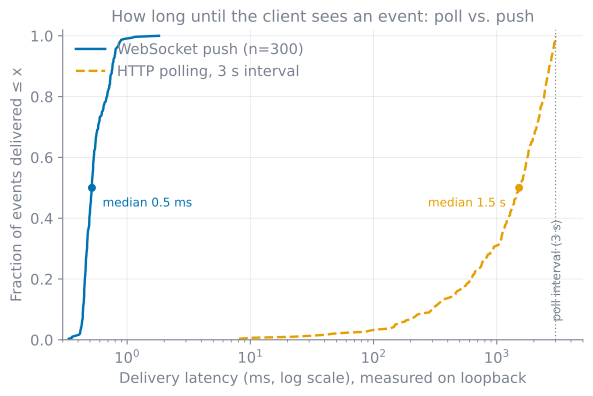
So how much does pushing actually buy you? I measured it. The setup: this consumer pattern served by daphne, 300 events fired at random moments, one WebSocket client that receives each event as a push, and one HTTP client that polls for news every 3 seconds. Everything on one machine, so a single clock times both sides and the wire cost is a loopback hop. What matters is the whole distribution, not the average, the same lens I used keeping LLM triage under a second.
Push delivered all 300 events in under 2 ms, median 0.5 ms: one network hop. Polling’s median was 1.5 s, and its deliveries smear from a lucky 8 ms (the event landed just before a poll) to the full 3 s (it landed just after one). The wait is uniform across the interval, which is why the median sits near half of it. On a real network both curves shift right by the same WAN hop, tens of milliseconds, and the three-orders-of-magnitude gap survives: polling’s latency is dominated by waiting for permission to ask, and that is precisely the cost a persistent connection deletes.
A persistent connection isn’t free, though. The browser WebSocket API has no backpressure: if the server pushes faster than the client drains, messages pile up in a buffer and memory grows. My measurement demonstrated this by accident: the emitting client also sat in the broadcast group, never read the echoes coming back, and once its receive queue filled its library stopped processing frames, keepalive pongs included, and the connection died mid-run. The server side has its own version of the problem: each channel has a capacity, and “trying to send() to that channel may raise ChannelFull.” Group sends never raise; the layer must “silently drop the message if it is over capacity,” following ASGI’s at-most-once delivery policy. So broadcasting is lossy under pressure by design, which is fine for a chat ping and very much not fine for a financial ledger.
Where I used this
I built exactly this on a Django chatbot project: an AsyncWebsocketConsumer, a single Redis-backed group, and database_sync_to_async around every ORM call so loading chat history and saving messages never blocked the event loop. The result is a chat that feels instant and stays in sync across tabs and users: no polling, no “refresh to see new messages”, just the server speaking the moment it has something to say. The socket is only the transport, of course; making the bot on the other end worth talking to is its own problem, and I’ve written about one slice of it in giving an LLM agent memory.
The pieces generalize well beyond chat. Any time the server knows something before the client could think to ask (a notification, a dashboard tile, a sandboxed run of model-written code finishing), the same three moves apply: a consumer that joins a group on connect, a group_send to fan the event out, and a disciplined sync/async boundary around the database. Get those right and the rest is ordinary Django.
If you’re running something real-time on Django in production, I’m curious which route you took: Channels, server-sent events, or an external push service, and what tipped the decision.
References
- Django Channels — Consumers — the
connect/receive/disconnectlifecycle and the event-driven model. - Django Channels — Channel Layers —
group_add,group_send,group_discard, and the Redis backend for production. - Django Channels — Channel Layer Specification — channel capacity,
ChannelFull, and the at-most-once policy for group sends. - Django Channels — Database access — why the synchronous ORM is unsafe in async code and what
database_sync_to_asyncdoes. - Django Channels — Testing —
WebsocketCommunicator, and why every test has todisconnect(). - Django — Asynchronous support —
sync_to_async, thethread_sensitivedefault,SynchronousOnlyOperation, and the note that transactions do not work in async mode. - Django — Making queries: asynchronous queries — queryset laziness,
async for, thea-prefixed methods, and transactions raising in async code. - Django — Databases — one connection per thread, and what
CONN_MAX_AGEgoverns. - Django — Testing tools —
TestCase’s two nestedatomic()blocks, and howTransactionTestCasediffers. - pytest-django — Helpers —
django_db(transaction=True)and theTransactionTestCasebehaviour it switches on. - asgiref — the
thread_sensitiveimplementation and its warning about thread-bound resources. - ASGI — Introduction — ASGI as the successor to WSGI and why WSGI can’t do WebSocket.
- ASGI 3.0 Specification — the
scope/receive/sendinterface and send-buffer semantics. - Django — How to deploy with ASGI — the
applicationcallable and the async-safety warning. - PEP 3333 — WSGI — the single synchronous callable ASGI was designed to move past.
- MDN — WebSocket API — the browser client: constructor,
messageevent,send(), and the no-backpressure caveat.
Working on something in this space, or hiring for it?
Keep reading
- Typed domain exceptions with stable error codes: the kernel raises a code, the adapter writes the proseAn accounting kernel that must never say a word to a user. Every domain failure gets a typed exception and a stable machine code; one adapter table turns that code into localized prose. Here's the hierarchy, the import cycle it caused, the contract check that reported green through a hole, and the bug I found writing this.August 11, 2026
- Credit-card billing cycles: domain logic and a migration that freezes historyThe day you swipe a card is not the month you're accounting for. Here's how I modelled credit-card billing cycles as a pure function, applied it in one save hook, and used an irreversible migration to stop a future rule change from rewriting the past.July 25, 2026
- One flexible API for many shapes: polymorphic vaults in Django REST FrameworkStoring recipes, bookmarks, journals and groceries behind a single REST surface: a polymorphic Item base, dynamically composed nested serializers, atomic multi-table writes, and the eager-loading that kills the N+1 queries.July 9, 2026
Get the next update by email
Build-in-public updates and new posts, delivered as a digest. Double opt-in · no spam · unsubscribe anytime · handled by Buttondown.